I Installed OpenClaw on My 6-Year-Old Redmi Phone. It's the Best AI Agent Experience I've Had.
How I turned a drawer-forgotten Redmi Note 7 Pro with a cracked screen into a 24/7 AI agent using OpenClaw, Termux, LineageOS, SSH, PM2, and DeepSeek — and why it beat running agents on servers.
everyone's buying Mac Minis to run AI agents. i pulled an old phone from a drawer.
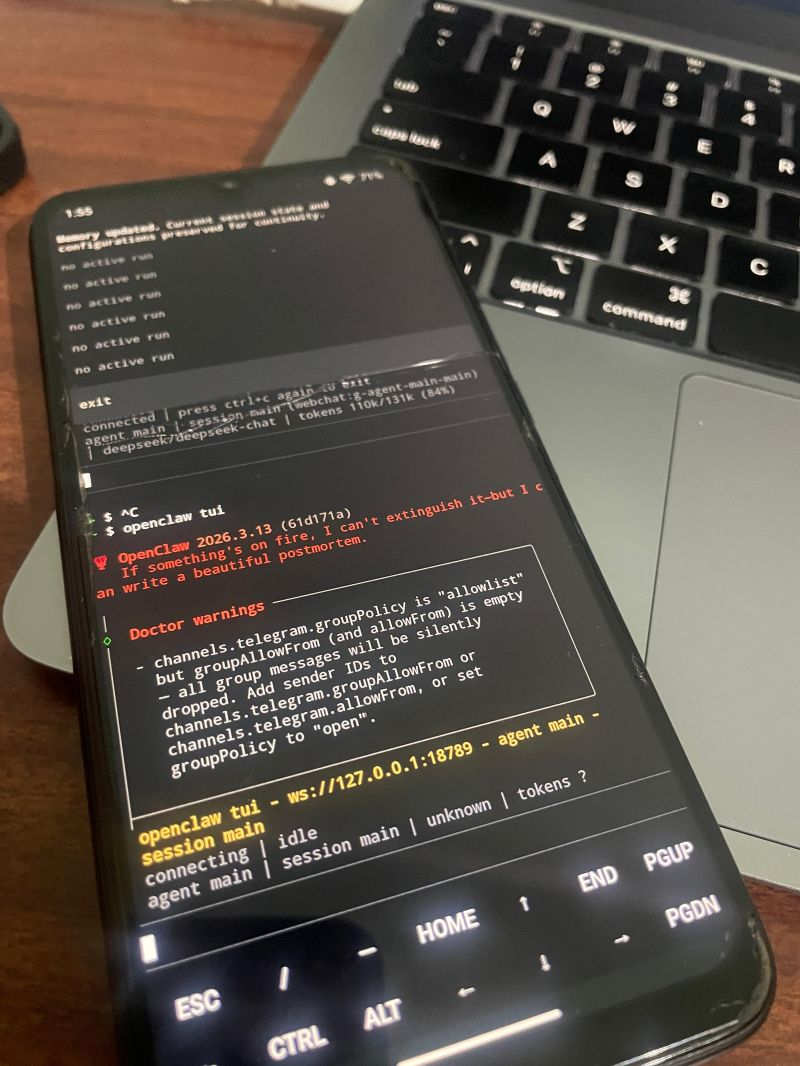
this is how a cracked, 6-year-old Redmi Note 7 Pro became my favorite agent host. not the most powerful host. the best one.
Why a Phone?
i've run OpenClaw on AWS, on my Mac, and on standard Linux boxes. all of them work. but they're still just processes in terminals.
phones are different. camera. speaker. mic. sensors. messaging apps. battery backup built in. and very low power draw.
when an agent gets access to all this, it stops feeling like "a script running somewhere." it starts feeling like something that can interact with the physical world.
that shift is why this became my favorite OpenClaw setup.
The Device
Redmi Note 7 Pro
- Snapdragon 675, 4GB RAM (about 3GB usable after OS)
- Cracked screen (touch still works)
- Was unused for 14+ months
- Original price: ~₹12,000 ($150)
- Current value: basically ₹0
i flashed LineageOS 23.2. that was important. MIUI is heavy, aggressive about killing background apps, and uses ~1.5GB RAM while idle. LineageOS stayed under 800MB idle and gave the agent much more room.
The Setup Stack
what i ran on the phone:
- Termux — Android terminal (F-Droid build, not Play Store)
- OpenClaw — installed via npm inside Termux
- DeepSeek — model provider for agent reasoning
- PM2 — keeps process alive 24/7
- SSH — manage from MacBook without touching screen
- ADB over TCP — configured at
localhost:5555for UI automation
no cloud server. no monthly bill. just one phone on a charger in the corner.
Setup here: github.com/Mohd-Mursaleen/openclaw-android
Installing Termux
first rule: install Termux from F-Droid, not Play Store. Play Store build is old and abandoned. F-Droid build is maintained.
initial setup:
# update everything
pkg update && pkg upgrade -y

# install essentials
pkg install nodejs-lts git openssh python -y

# verify node version (needs 22+)
node --version
one thing that can break everything: battery optimization. MIUI (and even LineageOS a bit) can kill background processes aggressively.
do this:
- Settings → Battery → App battery usage → Termux → set to Unrestricted
- run
termux-wake-lockwhen starting Termux (or put it in~/.bashrc) - pin Termux in recent apps
if you skip this, your agent can die silently after screen lock. i learned that the hard way. twice.
Installing OpenClaw
once Node is ready:
npm install -g openclaw@latestthen onboarding:
openclaw onboardonboarding handles API key, model, and channel setup. i picked DeepSeek because it's much cheaper than Claude/GPT-4 for always-on tasks, and quality was good enough for my automations.
for messaging, i connected Telegram. i message from my iPhone, agent responds from Redmi. two phones, one brain.
SSH: Managing the Phone Remotely
i didn't want to use a cracked screen every time i debugged. SSH fixed that.
inside Termux:
# start the SSH server
sshd

# check your username
whoami

# find the phone's IP
ifconfig wlan0
from MacBook:
ssh u0_a123@192.168.x.x -p 8022after this i could do everything from laptop: logs, restarts, updates, debugging. phone just stayed plugged in and running.
i also moved to SSH keys so i wasn't typing passwords all day. small thing, big quality-of-life improvement.
PM2: Keeping the Agent Alive
OpenClaw is a Node process. if it crashes or Termux restarts, you want automatic recovery. PM2 gives that.
# install PM2
npm install -g pm2

# start OpenClaw with PM2
pm2 start "openclaw run" --name openclaw-agent

# save the process list so it restarts on reboot
pm2 save

# check status anytime
pm2 status
PM2 gave crash restart, logs, and basic monitoring. it changed this from a weekend demo to a system that can run 24/7.
my agent has stayed up for weeks. restarts were mostly intentional updates.
ADB: The Secret Weapon
this is where phone-hosted agents become serious.
ADB over TCP lets the agent control Android UI programmatically.
i configured loopback access at localhost:5555 in Termux.
this unlocked:
- Screen automation — tap, swipe, type, navigate apps
- Screenshots — capture screen, run vision analysis, decide next action
- App control — launch apps, send messages, change settings
this is how i built autonomous ticket booking: open BookMyShow, select movie, choose seats, complete flow. end-to-end.
i'll write detailed ADB architecture in a separate post. for now: this is the difference between "agent on phone" and "agent that can actually do things."
What the Agent Can Do Now
with this setup, Redmi stopped being "just a phone." it's now a compact agent platform:
- Camera access — photos, scene capture, person detection (next post)
- Telegram bot — tasking + reporting
- Android automation — ticket booking, WhatsApp messages, app control via ADB
- Voice announcements — TTS through speaker
- Sensor data — accelerometer, gyroscope, ambient light
- File management — local file read/write and document processing
all this runs in ~200MB total RAM. on hardware that effectively costs nothing now. with built-in battery backup.
Servers Are Powerful. Phones Are Alive.
an EC2 instance is stronger on paper. more RAM, faster CPU, stronger network.
but it can't see, hear, speak, or touch the physical world. phone can.
and once an agent gets that interface, the experience changes completely. it stops being "agent running somewhere." it becomes brains with resources.
What's Next
this post was the foundation: install OpenClaw, keep it alive, operate it reliably.
next i go deep on one use case: kitchen surveillance on the same phone using MobileNet-SSD, OpenCV, and Telegram alerts.
spoiler: my friends were not happy when snack theft got detected.