My Agent Lives on a 2018 Phone. I Gave It Its Own Computer running same device.
How iota runs a Linux desktop and controls Android apps from one OnePlus 6, explained simply.
my AI agent lives on a 2018 phone. and now it has its own computer too. same phone.
if you saw the video on LinkedIn, here's what happened in it:
- i ask from my apple watch
- iota opens a youtube video on his own computer
- then he wakes the locked phone, opens rapido and checks the auto fare. ₹148, driver 4 min away, about 1.5 min end to end. he stops before booking.
no laptop. no cloud computer. one old phone doing all of it.
this post is how that works, in plain words.
first, who is iota
iota 👾 is my personal agent. he runs on Hermes, an open source agent framework by Nous Research. he lives on my OnePlus 6 inside Termux, an app that turns Android into a real Linux machine.
the only thing not on the phone is the AI model itself. the "thinking" happens in the cloud. everything else (memory, tools, the desktop, the hands) runs on the phone.
the big idea: a brain, a computer, and hands
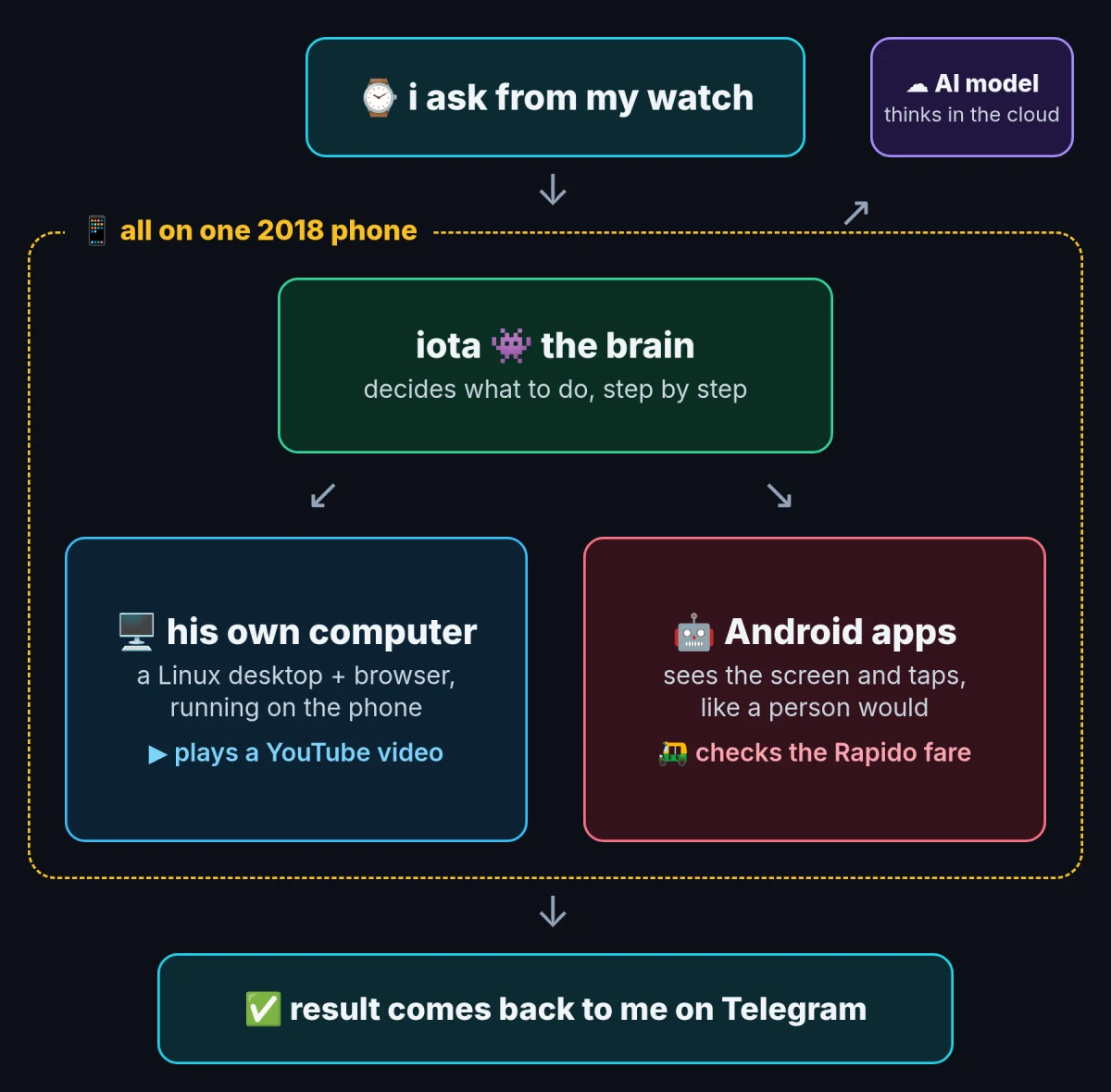
think of iota as three parts:
- the brain: Hermes. it reads what i asked, decides the next step, checks if it worked, and repeats.
- his own computer: a Linux desktop running on the same phone, with a browser he can drive.
- his hands on the phone: a small tool that lets him see and tap any Android app, like a person would.
the brain picks which one to use. youtube? that's a computer job. rapido? that's a phone job.
part 1: giving him a computer
most people don't know this, but your android phone can run a full desktop.
- Termux:X11 draws a Linux screen on the phone.
- XFCE is the desktop on top of it. wallpaper, taskbar, icons. a real computer.
- Chromium runs on that desktop with a remote-control port switched on (it's called CDP). that port is how iota clicks, types and reads web pages.
so when i say "open the GPT-6 Astra intro video on youtube", iota opens his browser, searches youtube, clicks the right result and hits play. on his own screen, not mine.
it's the same idea as "computer use" agents you've seen on laptops. the difference is the computer is inside my phone.
want to give your own agent a computer? i put the whole setup in a public repo: install, start the desktop, start the browser, point your agent at it. four commands, works with any agent.
👉 github.com/Mohd-Mursaleen/android-agent-desktop
part 2: giving him hands on android
a desktop can't open rapido. it is an android app. i built a small tool for this called droid. it does two things:
- eyes: an accessibility service reads every button and text on screen, so iota knows what he's looking at. if that fails, a backup reader (uiautomator2) takes over.
- hands: ADB, android's debugging tool, runs on the phone itself and sends taps, typing, swipes and the power button.
so iota's loop is simple: look at the screen, do one thing, look again to check it worked. wake the phone, open rapido, type the pickup, type the drop, read the fare.
the safety rule: droid refuses to tap anything like Book, Pay or Place Order. it stops and sends me a screenshot. iota can only press it after i say yes. that's why the video ends at the fare and not a booked ride.
part 3: talking to him from my watch
the watch is just a microphone.
- an Apple Shortcut turns my voice into text.
- it sends that text to a Cloudflare tunnel, a secure link from the internet to my phone, with no open ports.
- a tiny bridge on the phone says "got it" right away, so my wrist never waits.
- iota does the work in the background.
- the result, with a screenshot, lands on Telegram.
i wrote the full watch setup here: I Run My Company From My Watch Now.
part 4: keeping it alive
android loves killing background apps. so:
- pm2 watches every service (agent, bridge, tunnel, browser) and restarts anything that dies.
- Termux:Boot starts it all again after a reboot.
- a wake lock stops android from putting iota to sleep.
the phone sits on a charger. no fan, no noise, always on.
why an old phone
a OnePlus 6 costs about $100 now. it has 8 GB of RAM, a battery that works like a free power backup, and Android, which already is Linux underneath. for running an agent and its tools, that's plenty. the heavy AI part is in the cloud anyway.
if you want the multi-agent side of this phone, read Hermes on Termux.
how we made the video
that's the original post on LinkedIn if you want to react or share it.
the video was its own little project. i recorded raw takes on my mac, and the edit was done by agents:
- i first tried Cardboard, an AI video editor, for short reels.
- for this one i wanted custom animations, so a small team of AI agents split the work: one picked the best takes, one cleaned my audio and made original music, one built the animations in Remotion (video made with code), one generated the iota mascot, and one put it all together.
- version 2 had a sync bug: my face and the screen didn't match after 26 seconds. version 3 fixed it by using the same original recording for both views, frame for frame.
- every version got checked before i saw it: frame by frame, a transcript of the final audio, and a blur on anything private.